ACORD 125, 126 and 140: a preparation checklist
Prepare the information for ACORD 125, 126 and 140, reconcile source documents and review unknown answers. A practical checklist for US commercial lines agency teams.
ACORD 125, 126 and 140 appear in commercial lines application work, but they serve different parts of the file. Before filling fields, a US agency needs to identify the receiving market's requirements, assemble current risk information and resolve inconsistencies between documents. A populated PDF is not necessarily a submission ready for review.
This guide is a preparation checklist, not a reproduction of ACORD forms or a substitute for their instructions. It focuses on the data and checks that come before submission. Use properly licensed forms, the applicable current editions and the carrier's requirements for the particular risk.
What each form is for
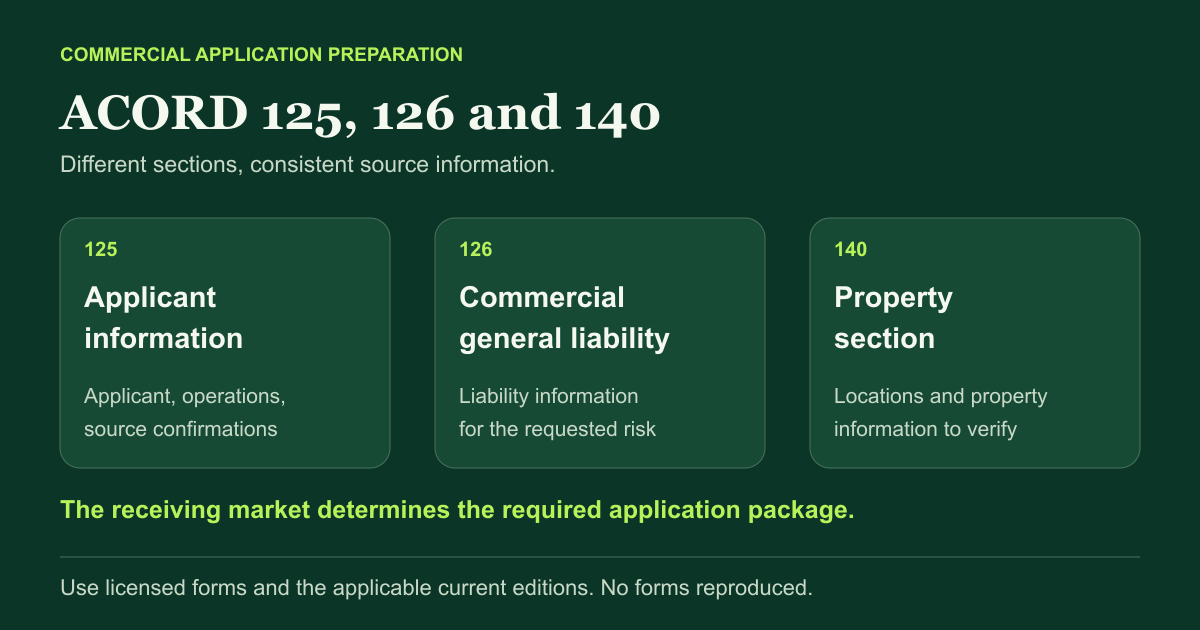
The official ACORD Forms Index identifies ACORD 125 as the Commercial Insurance Application Applicant Information Section, ACORD 126 as the Commercial General Liability Section and ACORD 140 as the Property Section. These are complementary sections, not three competing versions of the same form.
ACORD 125 provides the applicant-information section of the commercial application. ACORD 126 concerns commercial general liability. ACORD 140 concerns property. That classification helps identify which information belongs where; it does not establish that every market requires all three forms or that these forms are sufficient for every placement.
A carrier or wholesaler may require other sections, supplements, schedules or its own application. Confirm the requested package, jurisdiction and edition before preparing the file. Record who confirmed the requirements and avoid working from an old template simply because the agency used it last year.
Obtain the forms through an authorized channel
ACORD's Forms FAQ states that a valid license is required to use ACORD forms, including forms supplied through agency management or vendor software. A copy available on the internet is not evidence that your agency has the required license.
Check your organization's licensing and access arrangements. The official Forms Portal or your properly authorized software is the place to obtain the forms, not this article. Use the form's available instructions and check edition updates. Do not remove a section or alter fixed wording to make a PDF easier to fill.
Record the form number and the edition separately in the file. The number identifies the section; it does not establish that the copy is current. ACORD's Forms FAQ explains that forms are revised for business and regulatory changes. Check the edition supplied through your authorized channel and the receiving market's requirements rather than reusing the PDF saved from a previous submission.
Build a source sheet before copying values
For each material value, record the answer, the source document or client confirmation, the applicable period and whether it has been checked. Keep conflicts visible. For example, a prior application can be useful background, but it is not confirmation of the current payroll, locations or operations.
Distinguish three states: confirmed information, information received but not verified, and information still unknown. A blank field and a negative answer are not interchangeable. Where the market's process requires an answer, obtain the clarification or ask how to handle the outstanding item rather than using an invented value.
Keep a separate record of the figures that apply to each entity and location. If documents describe a parent company and a subsidiary differently, confirm the scope of the application. Do not flatten related entities into a single applicant record merely to speed up entry.
Preparation checks by section
Applicant information for ACORD 125
Confirm the applicant's legal identity, relevant addresses, contacts and operations with the client and the placement record. Reconcile the periods and identities shown in prior insurance and loss information. Distinguish a trading name from a legal entity and the mailing address from the premises to be insured.
General liability information for ACORD 126
Prepare the description of operations and the exposure information requested for the liability submission. Reconcile classifications and their exposure bases with the receiving market's instructions. A classification selected on a previous account is not necessarily appropriate for this insured. Route uncertain classifications to the responsible professional or underwriter.
Property information for ACORD 140
Prepare the applicable location, building and property information using current schedules and client confirmations. Verify which values relate to which premises and what basis they describe. Keep unknown construction, protection or occupancy information open; do not infer an underwriting answer from a photograph or a convenient default.
Across all sections
Check that the applicant, dates, locations and requested coverage remain consistent across the package. Review supplemental applications and attachments as part of the same submission. If a schedule is updated, revisit the fields that depend on it rather than leaving a mix of old and new values.
Seven checks before the application leaves the agency
- The forms and editions match the receiving market's requirements.
- The applicant and operations describe the actual risk being submitted.
- Material values have a source and apply to the appropriate entity, period and location.
- Conflicting answers have been resolved or clearly raised with the market.
- Unknown information has not been converted into a negative answer or a guessed fact.
- The required schedules, supplements and confirmations are present.
- The authorized team member has reviewed the final package and the applicable signature or approval requirements.
Illustrative example: the prior property schedule lists an old premises address, while the client's current message names a new location. Confirm the location and the associated property details, then reconcile the applicant information and property section. Copying the old schedule quickly would reproduce the conflict, not resolve it.
Where prefill helps, and where it does not
Prefill can reduce repeat entry after the source information has been checked. It cannot establish that an exposure exists, that an answer is current or that the underwriter will accept the risk. Agency defaults such as an approved contact may be reusable; risk facts and underwriting answers need their own evidence.
Once the risk information is verified, the carrier portal quoting guide explains how to reuse it without carrying unresolved answers into another application.
Keep the final application in the placement record: it is one of the sources needed for issued-policy checking after placement. The application, accepted terms and issued policy are different documents and should remain identifiable.
Ask to test one clean application and one with a conflicting address, incomplete schedule or missing answer. Review the final fields as well as the evidence and exception list. Measure the preparation time including review and correction, then keep responsibility for the final submission with your agency.
Frequently asked questions
What is the difference between ACORD 125, 126 and 140?
ACORD 125 is the Commercial Insurance Application Applicant Information Section. ACORD 126 is the Commercial General Liability Section, and ACORD 140 is the Property Section. The receiving market determines the required package.
Can I download free ACORD forms from this article?
No forms are hosted or reproduced here. ACORD states that its forms require a valid license, including forms accessed through vendor software. Obtain the appropriate forms through your authorized channel.
Can missing application answers be filled with defaults?
A default must not turn an unknown risk fact into a confirmed answer. Administrative agency details may be reusable after checking, but client exposures and underwriting answers need appropriate confirmation.
Can software prefill ACORD applications?
Some tools can prefill supported forms from source information. Check the specific form and edition, review the resulting fields and follow the market's requirements for signatures, confirmations and submission.